
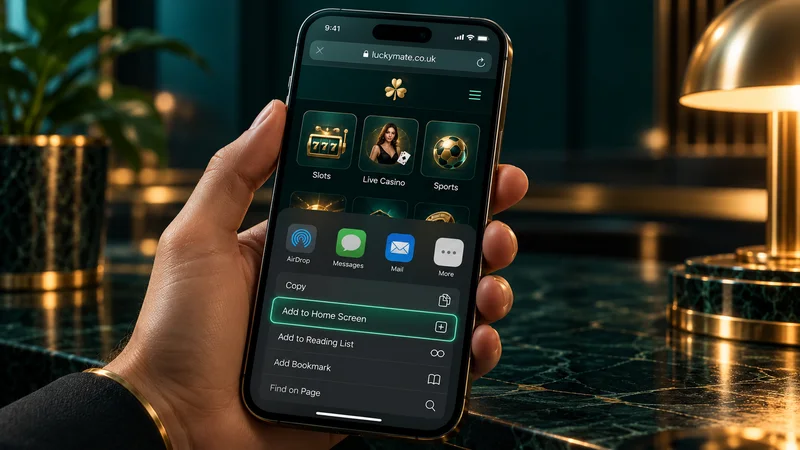
There is no LuckyMate app. Searches of the UK App Store and Google Play on 2 October 2026 found nothing from Anakatech Interactive, the company that runs LuckyMate, and the operator’s help pages say you don’t need one. On an iPhone or Android phone you use the mobile-first website at luckymate.co.uk in Safari or Chrome, with the same account, balance and cashier as on a computer. Saved to your home screen, it opens from an icon like an app. Store listings named “LuckyMate” or “Lucky Mate” belong to other developers; don’t install them or give them your login.
How we know LuckyMate has no app
- The app stores. A search of the UK App Store for “luckymate”, “lucky mate casino” and “anakatech” returns no app published by Anakatech, and the British Google Play store gives the same result for “luckymate”. Apple’s review rules expect a gambling app to be submitted by the company that provides the service, so a genuine LuckyMate app would carry Anakatech’s name under its title.
- LuckyMate’s own pages. The sports FAQ answers the mobile question with “no app needed, just log in and go”, and the casino page talks about play on phones and tablets “without downloads or bulky apps”.
- Most review sites. gambling.com, Sports Mole, WhichBingo, PokerListings and Betting.co.uk all describe a browser-only mobile service.
- The exception. Racing Post’s LuckyMate review describes a dedicated iOS and Android app, downloadable from both stores, with Touch ID and Face ID sign-in. Neither store lists such an app and LuckyMate’s pages say the opposite, so we treat that paragraph as a mistake.
Checked against LuckyMate’s published pages and UK App Store and Google Play search results on 2 October 2026.
18+ · New customers only · T&Cs apply
How to add LuckyMate to your home screen
A home-screen shortcut is a bookmark with an icon: tap it and luckymate.co.uk opens in your browser. Only the icon is added to the phone and it never needs updating; deleting it does nothing to your account. It also keeps you clear of lookalike sites, since it goes straight to the saved address with no search results to pick from.
So the first visit is the one to get right. Type luckymate.co.uk into the address bar yourself and check the address once the page loads. The Gambling Commission register has luckymate.co.uk and luckymatecasino.co.uk recorded against the brand.
iPhone and iPad (Safari)
- Open Safari and go to luckymate.co.uk.
- Tap the Share button, the square with an arrow pointing up. On newer versions of iOS it can sit behind the three-dot button next to the address bar.
- Scroll down and choose Add to Home Screen. If the option is missing, tap Edit Actions at the bottom of the list and add it.
- Name the shortcut and tap Add. The icon appears alongside your other apps.
Android (Chrome)
- Open Chrome and go to luckymate.co.uk.
- Tap the three-dot menu in the top-right corner.
- Choose Add to Home screen, change the name if you like and tap Add.
- Place the icon. Some phones put it on the home screen straight away; others ask you to drag it into position or tap Add a second time.
Samsung Internet, Firefox and other Android browsers have the same option in their menus. The result is a plain shortcut. LuckyMate’s homepage code, read on 2 October 2026, has an Apple touch icon (which gives the shortcut its logo) but no web app manifest, the file a browser needs before it can install a site as an app.
The shortcut opens the ordinary web sign-in, so your phone’s password manager fills it in as usual. Password resets, and what to do when the Login button won’t respond, are in our guide to logging in on your phone.
What works on the LuckyMate mobile site
LuckyMate treats the mobile site as the full product; its betting page says the sportsbook hasn’t been cut down for phones. One login opens every section. The sports FAQ says the balance is shared across devices, so a deposit made on your phone is there when you open the laptop. For the licence, bonus terms and payout record, see our LuckyMate casino review for UK players.
Casino games
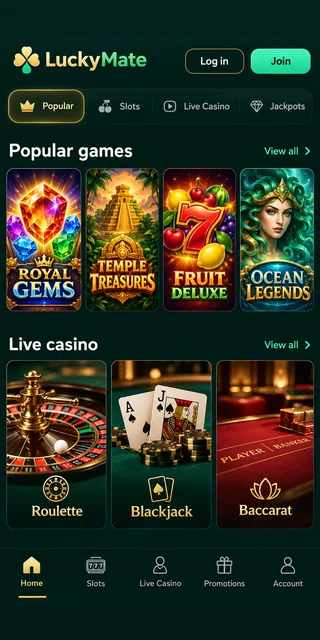
On 2 October 2026 the lobby listed 2,020 games, among them 1,667 slots, 43 Slingo titles, 28 crash and arcade games and 8 jackpot games such as Mega Moolah. The operator’s FAQs call its slots, Slingo and Megaways titles built for phones, and the Playtech FAQ adds that changing device or screen size leaves a game’s maths model, RTP and paytable unchanged. UK limits apply on the phone too: £5 a spin at most (£2 if you’re 18 to 24), autoplay and turbo switched off, and at least 2.5 seconds per spin. Our mobile slots guide explains providers, jackpots and bonus-excluded games.
Live dealer tables
The live section has 46 game shows, Crazy Time, Ice Fishing and Monopoly Roll ’em among them, plus roulette, blackjack and baccarat from studios including Evolution, Pragmatic Play Live, Playtech Live and Ezugi. LuckyMate publishes no figure for tables, and review sites put the total at over 200 live games. The video keeps streaming for as long as you stay at a table, so a long live session is better on Wi-Fi. Studios and table types have their own page: live dealer games on mobile.
Sports betting
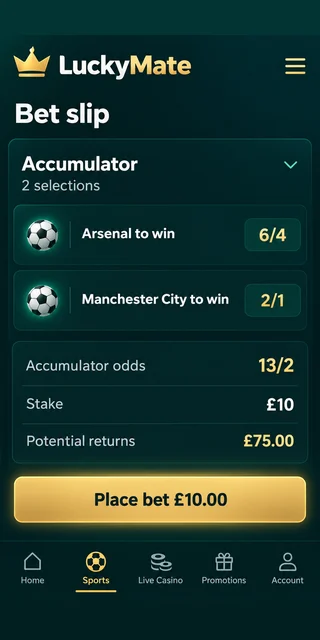
Sport runs on an Altenar platform and opens in the same browser tab as the casino. It has pre-match and in-play markets, Bet Builder, ACCA Boost and Cash Out, partial Cash Out included. Nothing on LuckyMate’s pages mentions live video of sporting events, so don’t expect to watch matches through the site. For markets, racing terms and the LM10 offer, read our guide to betting on mobile.
Cashier: deposits and withdrawals
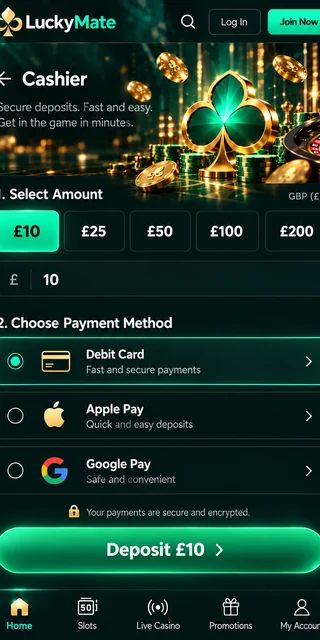
LuckyMate’s confirmed payment methods are Visa debit, Mastercard debit, Apple Pay, Google Pay and Trustly instant bank transfer. On a phone the two wallets are quicker: you approve the payment with Face ID, a fingerprint or your passcode instead of typing a card number on a small keyboard. Both deposits and withdrawals have a £10 minimum and no fee, and withdrawals are paid to the method you deposited with.
The wallet also affects the welcome offers. Google Pay qualifies for the casino spins but not for the LM10 sports free bet, which takes only Visa, Mastercard and Apple Pay. Our page on Apple Pay and Google Pay deposits covers limits, pending payments and the name on your bank statement.
Account, limits and help
Every safer gambling control is reachable from the phone. Deposit limits (daily, weekly or monthly) and loss limits are set in your account; a cut applies at once, a rise after 24 hours. Reality checks are available, as are time-outs from 24 hours up to 6 weeks, plus self-exclusion lasting 6 months to 5 years. Support can add a session time limit on request, and LuckyMate is connected to GAMSTOP. The safer gambling page describes reality-check settings for the device as well as the account, so check the one on the phone you play on.
To send ID from the phone, go to Profile, My Account, then Verify Identity or Upload Documents; files must be JPEG, 5 MB at most. iPhones save photos as HEIC by default, so if an upload is refused, set Settings, Camera, Formats to Most Compatible and new photos will save as JPEG.
LuckyMate’s live chat runs in a Freshchat window on the mobile site, and the other route is email to [email protected]; LuckyMate has no telephone support.
If gambling on your phone becomes hard to put down, the National Gambling Helpline is on 0808 8020 133 (England and Scotland, 24/7), 0808 2819 265 in Wales and 08000 886 725 in Northern Ireland.
Mobile site or app: how they compare
The middle column shows LuckyMate’s site as it works today; the right-hand one is a typical native casino app in general terms.
| Feature | LuckyMate mobile site | A typical casino app |
|---|---|---|
| Where you get it | Type luckymate.co.uk into Safari or Chrome | Download from the App Store or Google Play |
| What goes on your phone | A home-screen icon, if you add one, and browser cache | The app, its updates and its stored data |
| Updates | None to install; you load the current site each time | Through the store, sometimes required before you can play |
| Signing in | Username and password, which your phone’s password manager can fill | Often Face ID, Touch ID or a fingerprint inside the app |
| Games and markets | The full casino, live lobby and sportsbook, according to LuckyMate | Whatever range the operator chooses to include |
| Payments | Visa and Mastercard debit, Apple Pay, Google Pay, Trustly | Set by the operator |
| Safer gambling tools | Limits, reality checks, time-out and self-exclusion in your account | The same UK rules, with tools in the app’s settings |
| Risk of fakes | Low once the real address is saved as a shortcut | Lookalike store listings and APK files from outside the stores |
What you give up is biometric login inside an app, and a password manager covers most of that; there is also nothing to install or update. Removing the shortcut doesn’t block the site, though. For a break, a time-out, self-exclusion or GAMSTOP shuts off access properly, and blocking software such as BetBlocker, listed on LuckyMate’s safer gambling page, works on phones as well as computers.
Apps and downloads that are not LuckyMate
A store search for the brand name does bring up apps, none of them from the operator. These were listed on 2 October 2026:
| App name | Store | Developer | What it is |
|---|---|---|---|
| LuckyMate | App Store (UK) | Shenzhen Shenyuan Artificial Intelligence Technology Co., Ltd | Unrelated app sharing the name |
| Lucky winner — Spins and Coins | App Store (UK) | Not Anakatech | Unrelated app in the same search |
| Luckymate | Google Play (UK) | ODER 2000 | Unrelated app sharing the name |
| Mr. Lucky Mate | Google Play (UK) | Not Anakatech | Unrelated app with a similar name |
| Lucky Mate Casino | App Store (New Zealand) | COOPERS CREEK GAME LIMITED | Offshore casino app aimed at Australia and New Zealand, with no link to the UK licence holder |
Anakatech Interactive Limited and Anakatech Limited published none of them, so none should get your LuckyMate username, password or card details. A listing can copy a brand’s name and colours, so check the developer name under the app’s title before you install anything.
LuckyMate APK files
With no Android app, LuckyMate has no APK to hand out, so a “LuckyMate APK” on a download site or in a messaging group was made by a third party. Installing it means allowing apps from unknown sources, which switches off one of Android’s own checks, and an app dressed up as a casino login can pass on anything you type into it. If one is on your phone, delete it, change your LuckyMate password at luckymate.co.uk and tell support by chat or email. Ring your bank too if you entered card details.
Data, speed and battery
LuckyMate publishes no data-use figures, and usage varies by game, so the advice here is general.
- Live games are the heaviest. Game shows and live tables stream non-stop and drain data and battery much faster than slots or the sportsbook.
- Watch the bet slip on a weak signal. If it keeps loading, check your open bets before retrying so the same bet isn’t placed twice. In-play prices can move while a slow connection catches up.
- Dropped rounds. If the connection cuts out mid-game, reopen the game and check your balance and game history before contacting support. LuckyMate’s User Agreement has a section on aborted or interrupted sessions setting out how they are handled.
- Update the browser first. Safari updates with iOS, Chrome through Google Play. If a game won’t load or the cashier hangs, update and restart the browser and close other tabs.
LuckyMate app FAQ
Where can I download the LuckyMate casino app?
You can’t, because LuckyMate hasn’t released one; the operator has nothing in the UK App Store or on Google Play. Open luckymate.co.uk in Safari or Chrome and add it to your home screen for one-tap access.
Is there a LuckyMate APK for Android?
No. LuckyMate doesn’t publish an Android app, so any APK carrying its name is not from the operator. Leave it alone and use luckymate.co.uk in Chrome.
Can I use LuckyMate on an iPad or Android tablet?
Yes. LuckyMate’s FAQs say the games run in the browser on tablets as well as phones, and on an iPad Safari’s Add to Home Screen works as it does on an iPhone.
Is my LuckyMate account the same on my phone and computer?
Yes. You have one account and one balance, which LuckyMate’s FAQ says is shared between devices. Deposit and loss limits sit on the account, so they apply on every device.
Is there a LuckyMate app bonus?
No. With no app, there is no app-only or mobile-only offer. On the mobile site new customers get the same welcome offers as on a computer, MATE50 for the casino or LM10 for sports, entered in the Cashier with the first deposit.
Why does Racing Post say LuckyMate has an app?
The Racing Post review describes iOS and Android apps with Touch ID and Face ID log-in, yet neither store lists one and LuckyMate’s own FAQs say no app is needed. We read that part of the review as an error.